All Learners
 |
The Technologies Faculty are continuing to upload work for all pupils, year groups and courses using Microsoft Teams. Learners should upload their work when complete (either to the group or to their personal OneDrive). |
Technologies Pupils (S1 to S3)
Option 1:
Pupils are encouraged to review the resources on: https://daydreambelievers.co.uk/
Select and activity and click download right away to begin. Where activities ask for teams get your family involved.
We recommend the following 3 to get started with:
- Something for nothing.
- The standout method.
- The positive power of negative thinking.
Option 2:

Work at your own pace and complete the Bronze iDEA Award. This programme of work will develop and demonstrate your skills in digital, enterprise and employability.
Click the link, sign up and begin learning - there are lots of mini projects to chose from!
Begin the iDEA award by clicking here: https://idea.org.uk/
Option 3:
Use Autodesk Homestyler to plan a new room / building. You can access Homestyler here: https://www.homestyler.com
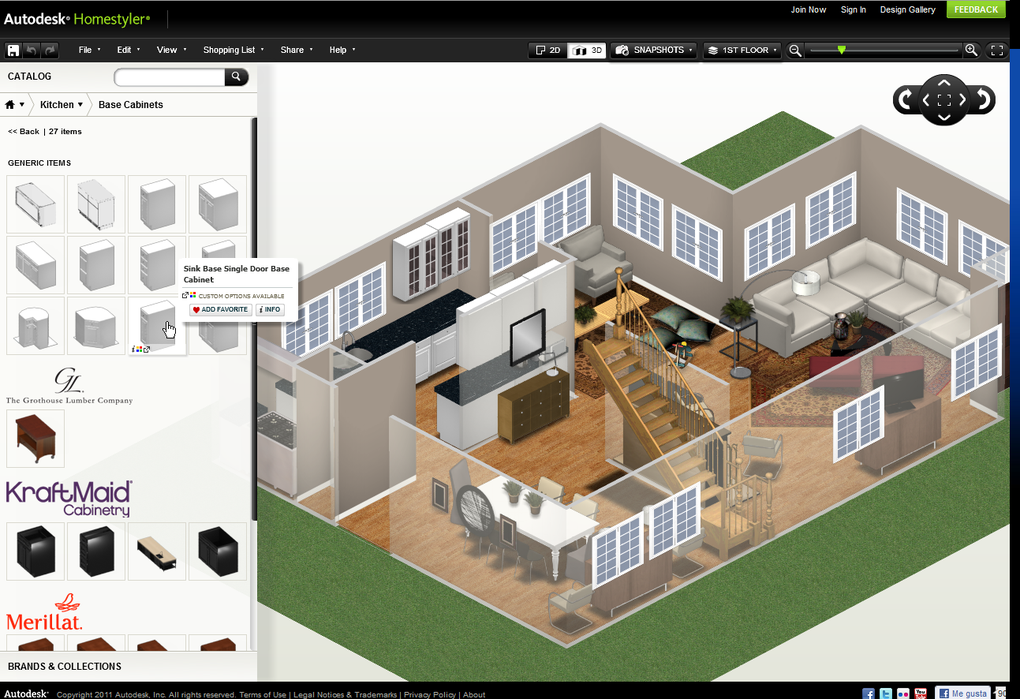
Autodesk Homestyler is a great tool for producing Floor Plans. The website is easy to navigate and allows you to create custom designs which you can populate with a variety of furniture, fixtures and fittings. Before you are able to use and SAVE your work on Homestyler, you must sign up. Enter your email address when signing up.
Take some time to familiarise yourself with the tools and how homestyler works. There are plenty of tutorials on YouTube, have a look at these if you need support.
Technologies Pupils (S4 - S6)

Continue preparing for your final exam - use the materials on your class Teams Group or OneNote.
Use the bbc bitesize materials / scholar if available (not all courses are available). In addition more materials can be found on the SQA website.
National 4 Technologies - https://www.bbc.co.uk/bitesize/subjects/zd8qhyc
National 5 Technologies - https://www.bbc.co.uk/bitesize/levels/z6gw2hv
Higher Technologies - https://www.bbc.co.uk/bitesize/levels/zkdqxnb
There are lots quizes for all subject areas on the Bright Red website.
Sign up and complete them here: https://www.brightredpublishing.co.uk/
[If you experience any erros when receiving your brightred email just go to "log on" and enter the email address you registered with as your username and enter the password you used to set up the account.]
All learners
 |
There are thousands of ideas and support videos on YouTube. These cover all aspects of the technologies curriculum. Start by searching some of the topics shown below.
For example:
|
 |
Focus Education software provide a variety of resources that cover all areas of the D&T curriculum. These can be used to support the learning of S1 to S6 pupils. Specific areas to look at for classes will be posted in our Teams group. To access Focus Education click here: www.focuselearning.co.uk Username: student@grangemouthhigh1400 Password: cpas5okd4
|